Joystick Soldering Iron Tip Heating Mold Review: Is It Worth Your Money?
We’ve all been there. You’re in the middle of an intense gaming session, and suddenly, your character starts drifting to the left. You aren’t touching the stick, but your controller thinks you are. It’s the dreaded "stick drift."
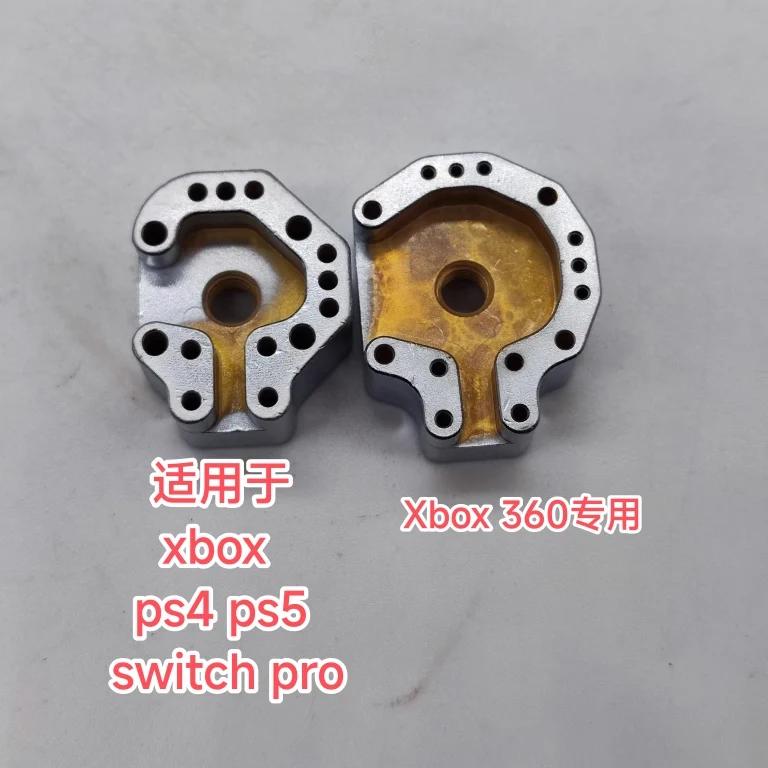
You look up the cost of a brand-new controller, see the $70+ price tag, and decide to try fixing it yourself. You buy the replacement joystick modules, but then you hit a wall: desoldering those tiny, stubborn pins on the controller’s circuit board is a nightmare. This is where the Joystick soldering iron tip Heating mold for Xbox ps4 ps5 switch pro Xbox360 controller joystick Disassembly repair tools comes into play.
Is this simple tool the secret to easy controller repairs, or is it just another piece of junk destined for the back of your drawer? Let’s find out.
What is the Joystick Soldering Iron Tip Heating Mold?
In simple terms, this is a specialized soldering iron attachment designed specifically for removing joystick modules. If you’ve ever tried to remove a joystick with a standard conical soldering tip, you know the struggle. You have to heat one pin at a time, and by the time you move to the next one, the first one has already cooled down and hardened. It feels like you’re trying to untie a knot while wearing mittens.
This heating mold is shaped to cover all the pins of a joystick module at once. By heating all the solder joints simultaneously, the module basically falls right out of the board.
The main appeal here is that it is a budget-friendly solution for DIYers who don't want to spend hundreds of dollars on a professional hot-air rework station. Plus, you can often find these online with free shipping, making it a very low-risk investment for your repair kit.
Key Features of the Joystick Soldering Iron Tip Heating Mold
This tool doesn't have fancy electronics or Bluetooth connectivity. It’s a piece of metal, but its design is where the value lies.
- Universal Compatibility: It’s marketed for Xbox, PS4, PS5, Switch Pro, and even the older Xbox 360 controllers. Because most of these controllers use similar joystick module footprints, one tip can handle a wide variety of repairs.
- Uniform Heat Distribution: The mold is designed to sit flush against the pins. When your soldering iron heats the mold, it transfers that heat evenly. This prevents you from overheating one area of the circuit board, which is a common way to accidentally lift a trace (and ruin your controller permanently).
- Compact Size: It’s small enough to fit in any basic tool kit. You don’t need a dedicated workbench or a massive power supply to get it working.
How This Tool Changes Your Repair Routine
If you’ve ever ruined a controller board because you held your iron on a pin for too long, you’ll appreciate this tool immediately.
When you use a normal tip, you’re often "prying" the joystick out while it’s still partially soldered. That’s how you rip the copper pads off the board. With this Joystick soldering iron tip Heating mold for Xbox ps4 ps5 switch pro Xbox360 controller joystick Disassembly repair tools, you aren't prying. You are simply letting the solder reach its melting point across all pins at once. Once the solder is liquid, the module slides out with zero resistance.
It turns a 20-minute, high-stress ordeal into a 2-minute task.
Pros and Cons: An Honest Look
No tool is perfect. Before you buy, weigh these factors carefully.
Pros:
- Time-Saver: It cuts the disassembly process down significantly.
- Board Safety: Significantly reduces the risk of overheating the motherboard or ripping traces.
- Budget-Friendly: It costs a fraction of what a professional-grade desoldering gun or hot-air station would cost.
- Easy to Find: Many sellers offer this with free shipping, making it a cheap experiment if you’re curious about controller repair.
Cons:
- Requires a Good Iron: If your soldering iron doesn't have enough wattage, this mold won't heat up enough to melt all the solder at once. It works best with a decent-quality iron (at least 40W-60W).
- Learning Curve: You still need to know how to use flux and how to clean up the remaining solder after the module is removed. It’s not a "magic button" that does the whole job for you.
- Build Quality: Since these are often mass-produced, the finish on the metal can be a bit rough. You might need to tin the tip with solder before your first use to ensure good heat transfer.
Who is this tool for? (And who should skip it?)
This tool is for you if:
- You are a gamer who likes to tinker and wants to save money by fixing your own stick drift.
- You have a few controllers sitting in a "broken" pile and want to bring them back to life.
- You are on a budget and don't want to invest in expensive professional repair equipment.
Skip this if:
- You have never used a soldering iron before. You should practice on a junk circuit board first, as you can still burn the board if you aren't careful.
- You are looking for a professional-grade, "buy-it-for-life" tool. This is a budget accessory, not a high-end lab tool.
What Users Are Saying
To give you a better idea of what to expect, here are a couple of synthesized experiences from users who have tried this mold:
- "I was skeptical about a piece of metal doing the work of a $200 desoldering gun, but it actually worked. I used it on my PS5 controller. It took a few tries to get the hang of how much solder to use for the heat transfer, but once I got it, the module popped right out. Definitely worth the few bucks." — Mark, DIY enthusiast.
- "It’s a handy little tool, but don't expect miracles if your soldering iron is weak. I had to crank my iron to max heat to get this mold hot enough to do the job. It saved me a lot of stress, but make sure you have some flux handy." — Sarah, Gamer.
Final Verdict: Is it worth the money?
If you want to repair your own controllers, this Joystick soldering iron tip Heating mold for Xbox ps4 ps5 switch pro Xbox360 controller joystick Disassembly repair tools is a fantastic, budget-friendly addition to your workbench. It isn't a premium piece of engineering, but it solves the biggest headache of joystick replacement: removing the old, stuck module.
Is it perfect? No. You still need to have some basic soldering skills, and you need a halfway-decent iron to make it work effectively. But considering you can often find it with free shipping, the risk is incredibly low. If you're tired of throwing away $70 controllers every time the sticks start to drift, this little mold is a very smart purchase. Just take your time, use plenty of flux, and practice on an old controller before tackling your main one.