Bitfunx GC Video HDMI™ Adapter Review: Is It Worth It for Your GameCube?
You finally dug your old Nintendo GameCube out of the attic. You’ve got your favorite copy of Super Smash Bros. Melee or Metroid Prime ready to go. You plug it into your shiny, modern 4K TV using those old, dusty composite cables (the red, white, and yellow ones), and… oh no. The picture is a blurry, muddy mess. It looks like you’re playing through a thick layer of Vaseline.
We’ve all been there. Modern TVs aren’t designed to handle 20-year-old analog signals. That is where the Bitfunx GC Video HDMI™ Adapter Digital AV to HDMI™ GC2HD for Nintendo Gamecube NGC DOL-001 Game Console comes into the picture. It promises to drag your GameCube into the high-definition era without costing you a fortune. But does it actually work? Let’s find out.
What is the Bitfunx GC Video HDMI™ Adapter?
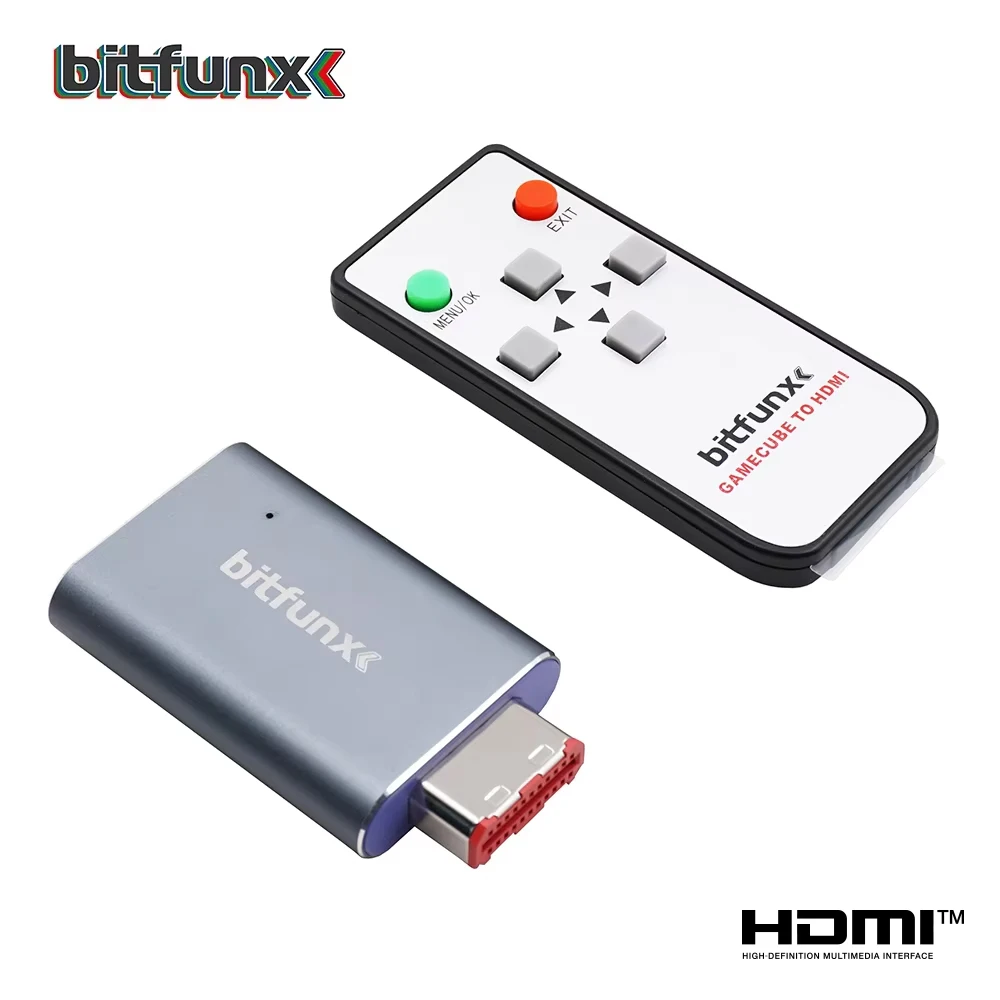
The Bitfunx GC Video HDMI™ Adapter Digital AV to HDMI™ GC2HD for Nintendo Gamecube NGC DOL-001 Game Console review isn't just about specs; it’s about accessibility. If you own a DOL-001 GameCube—the version with the digital port on the back—this little device plugs directly into that port and converts the raw digital signal into an HDMI signal your modern TV can understand.
The main appeal here is price. For years, the gold standard for GameCube video was the "Carby" or the original EON GCHD, both of which cost a pretty penny. Bitfunx offers a budget-friendly alternative that aims to give you 90% of the performance for a fraction of the cost. Plus, you can often find this item with free shipping on major marketplaces, making it a low-risk upgrade for your retro setup.
Why Quality Cables Matter for Your GameCube
If you’ve never used a digital-to-HDMI adapter, the difference is night and day. Standard composite cables send a single, combined signal that your TV has to "guess" how to display. This results in color bleeding and soft, fuzzy edges.
The Bitfunx adapter grabs the digital signal directly from the source. This means:
- Crisp Text: Menus and HUD elements in games become sharp and readable.
- Vibrant Colors: You’ll notice the actual intended color palette of your games, not the washed-out version you’re used to.
- Reduced Input Lag: Because the adapter handles the conversion efficiently, you aren't fighting your TV’s internal upscaler, which can cause annoying delays in fast-paced games.
Key Features of the Bitfunx GC Video HDMI™ Adapter
It isn’t just a "plug and play" dongle; it actually has some hidden brains. Here is what you get for your money:
The GCVideo Firmware This adapter runs on the open-source "GCVideo" firmware. This is a huge deal. It means you have access to an on-screen menu that lets you tweak settings. You can force the console to output in 480p, adjust the aspect ratio, and even add scanlines if you want that "old school CRT" look on your flat-screen TV.
Build Quality and Design Let’s be honest: the build quality is functional, not luxury. It’s made of plastic, and it’s lightweight. It doesn't feel like a premium piece of hardware, but it fits snugly into the DOL-001 digital port. It’s small enough that it doesn't get in the way of your power cable or memory cards.
Ease of Use You don't need to be a tech wizard to use this. You plug it in, connect your HDMI cable, and select the correct input on your TV. If you want to change settings, you just use your GameCube controller to bring up the menu. It’s intuitive and very user-friendly.
Pros and Cons of the Bitfunx GC Video Adapter
To give you an honest look at this device, here is where it shines and where it falls short.
Pros:
- Affordability: It is significantly cheaper than the high-end boutique adapters on the market.
- Sharp Visuals: The jump from composite to HDMI is massive; you will see details you never noticed before.
- Customizable: The on-screen menu allows for fine-tuning that most cheap adapters lack.
- Easy Setup: You don't need to modify your console or solder anything.
Cons:
- Plastic Build: The casing feels a bit cheap and can feel slightly loose if you bump the back of the console.
- DOL-001 Only: If you have the later "DOL-102" model (the one that removed the digital port), this adapter won't fit. You’ll need a different, more expensive solution.
- Missing Features: It doesn't always include the extra "pass-through" ports that more expensive models have for audio or additional video outputs.
Who is this for (and who should skip it)?
You should buy this if:
- You own a DOL-001 GameCube and want to play on a modern TV.
- You are on a budget-friendly quest to improve your retro gaming setup.
- You want a simple, no-fuss solution that works right out of the box.
You should skip this if:
- You own a DOL-102 GameCube (check the bottom label of your console!).
- You are a "purist" who insists on using a high-end, metal-encased adapter for durability.
- You are looking for an all-in-one device that handles complex audio routing or multiple console inputs.
What Real Users Are Saying
“I was skeptical because of the low price, but I’m genuinely impressed. I plugged it into my 55-inch 4K TV, and my GameCube games finally look like they belong there. The menus are a bit fiddly, but once you set it to 480p, you’re good to go. Definitely worth the price.” — Mark T., Retro Gaming Enthusiast
“It’s a decent piece of kit. It’s definitely made of cheaper plastic than the expensive ones, but it gets the job done. I found it with free shipping online, and it arrived in a few days. If you just want to play games without breaking the bank, this is the one.” — Sarah J., Casual Gamer
Final Verdict: Is It Worth the Money?
In this Bitfunx GC Video HDMI™ Adapter Digital AV to HDMI™ GC2HD for Nintendo Gamecube NGC DOL-001 Game Console review, we’ve looked at the good and the bad.
If you are just looking to play your childhood games without the headache of blurry, analog signals, this adapter is a fantastic choice. While it isn't the most "rugged" piece of hardware on the market, it offers the best balance of performance and price. It does exactly what it says on the box, and for most gamers, that is exactly what matters.
If you have a DOL-001 console, stop struggling with composite cables. This is an affordable, effective way to get your GameCube looking sharp again. Just remember to check your console model before you click "buy," and you’ll be ready to jump back into Hyrule or the Mushroom Kingdom in no time.